Download and Configure Terraform and Verify the Terraform Version
You can download the terraform software from Terraform official website (https://www.terraform.io/downloads.html)
Terraform Software Supports on various OS:
Linux
Windows
MacOS
Solaris
etc…

You can download for 64 bit or 32 bit software based on you OS architecture.
Download and configure for Windows:
1. Download terraform software for windows
2. Extract/unzip the software.
3. Open “Edit the system environment variable” from windows/run prompt

4. Click Environment Variables

5. Click on Path setting and add the Terraform software PATH
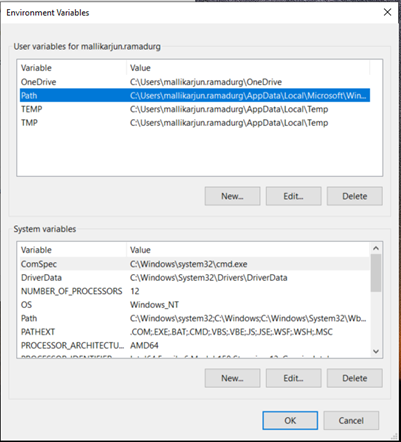

6. Save the setting
7. Open the command prompt and verify the Terraform version

Download and configure for Linux:
1. Download terraform software for Linux OS.
2. A) If you downloaded Terraform software on windows system then use
Winscp tool to copy Terraform software from Windows to Linux server
B) You can directly download the Terraform software on Linux Server user wget command
[root@oraclemv terraform]# wget https://releases.hashicorp.com/terraform/1.0.1/terraform_1.0.1_linux_amd64.zip
--2021-06-30 14:16:23-- https://releases.hashicorp.com/terraform/1.0.1/terraform_1.0.1_linux_amd64.zip
Resolving releases.hashicorp.com (releases.hashicorp.com)... 151.101.41.183, 2a04:4e42:a::439
Connecting to releases.hashicorp.com (releases.hashicorp.com)|151.101.41.183|:443... connected.
HTTP request sent, awaiting response... 200 OK
Length: 33044548 (32M) [application/zip]
Saving to: ‘terraform_1.0.1_linux_amd64.zip’
100%[==========================================>] 33,044,548 8.55MB/s in 4.8s
2021-06-30 14:16:29 (6.62 MB/s) - ‘terraform_1.0.1_linux_amd64.zip’ saved [33044548/33044548]
[root@oraclemv terraform]#
3. Extract/unzip the software on Linux Server on any location.
4. Once the extract is done you will see the software “terraform”,
you can copy that file to /usr/bin/ or /usr/sbin/
[root@oraclemv terraform]# ls -ltrh
total 109M
-rwxr-xr-x. 1 root root 77M Jun 24 20:39 terraform
-rw-r--r--. 1 root root 32M Jun 30 14:09 terraform_1.0.1_linux_amd64.zip
[root@oraclemv terraform]# cp terraform /usr/bin/
[root@oraclemv terraform]# cp terraform /usr/sbin/
[root@oraclemv terraform]#
5. Verify the terraform version using below command
[root@oraclemv terraform]# which terraform
/usr/sbin/terraform
[root@oraclemv terraform]# terraform version
Terraform v1.0.1
on linux_amd64
[root@oraclemv terraform]#
Regards,
Mallik


No comments:
Post a Comment